ROLELead Product Designer
UX RESEARCH · PRODUCT DESIGN · AI COLLABORATION
Designing a Research-First Conference Tool
A zero-to-one system for human- and AI-moderated research sessions—designed so the conversation stays primary while research work happens around it.
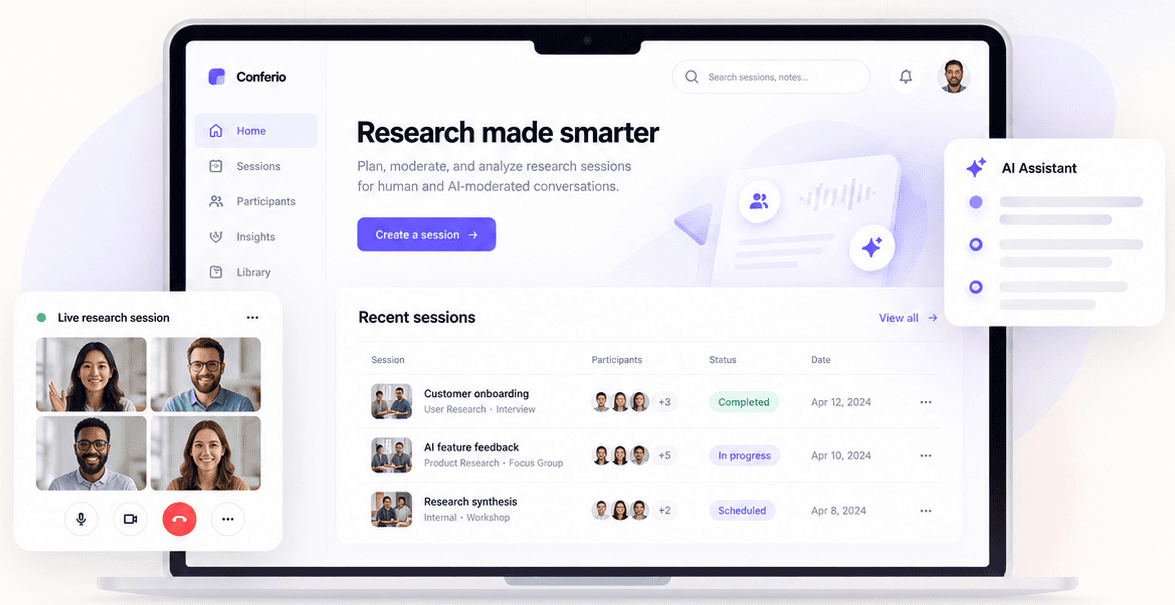
▶ PRODUCT WALKTHROUGH
The product story, explained while it moves.
A guided walkthrough of the original portfolio UI concepts—entry, live research, research tools, AI moderation and responsive behavior.
01/ 07
Entry
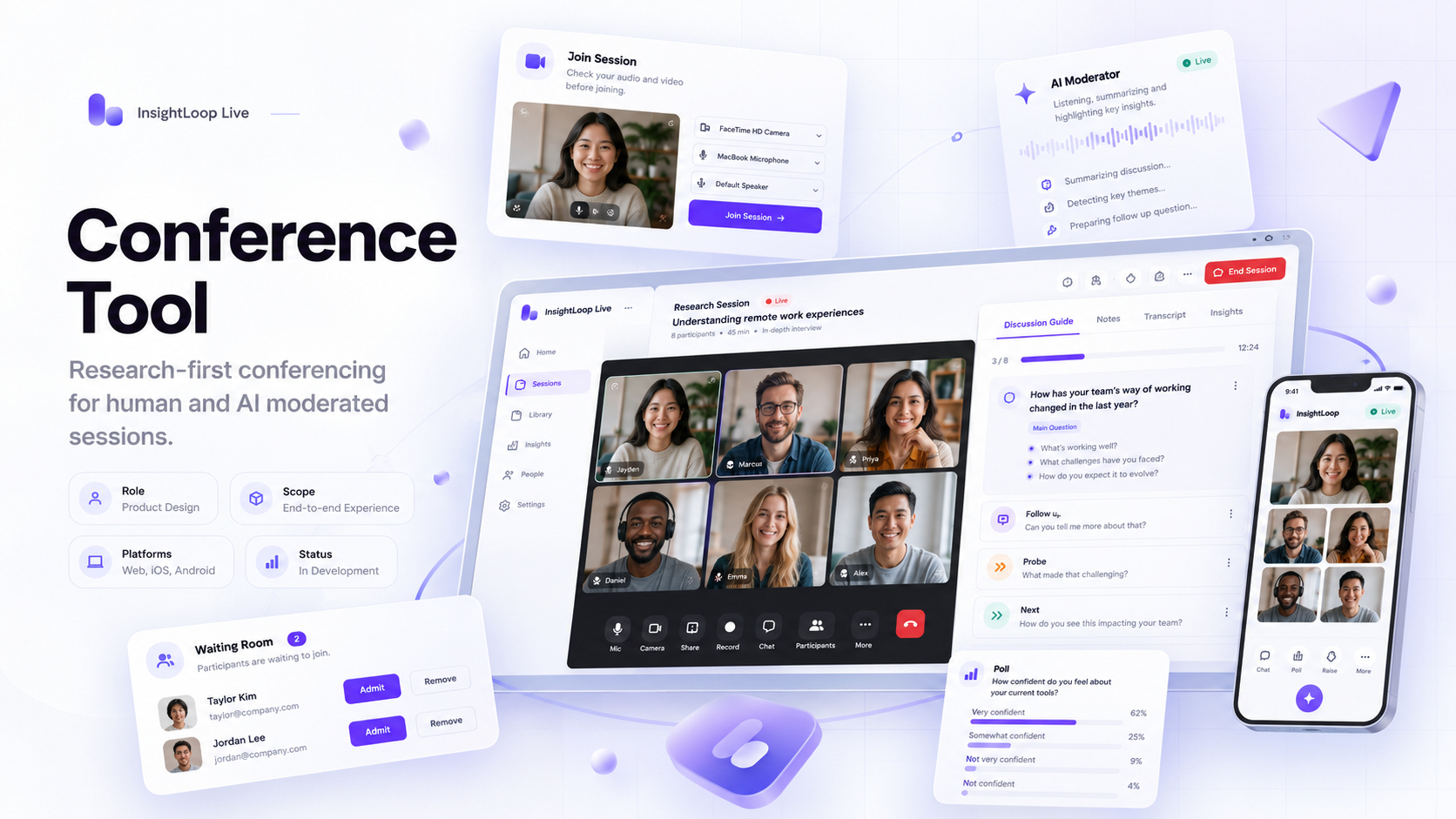
01 · EntryJoin with confidence
Study context, camera, microphone and participation expectations are handled before the live session.
WHAT TO NOTICEReadiness before research begins
Original case-study UI concepts created for this portfolio presentation. Coachmarks explain the interaction intent without obscuring the product.
02 · CONTEXT + CHALLENGE + MY ROLE
A meeting interface was only the starting point.
The real product challenge was deciding which capability, control and information deserved attention for a particular person at a particular moment.
Research needs more than conferencing.
Audio, video, chat and sharing are only the substrate. Live research also needs Discussion Guides, Notes, Key Moments, Polls, Stimuli, Whiteboard, Breakouts, transcripts, Backroom collaboration and research-specific permissions.
Power without visible complexity.
Every capability adds value. Every visible control competes for attention. The system had to stay familiar while adapting by role, session state and research task.
Lead Product Designer
I led experience strategy, critical workflows and UI, cross-role consistency, component behavior, engineering clarification, implementation review and design-led UAT—without claiming solo authorship of every screen.
DESIGN PRINCIPLE
“Use a familiar meeting model as the foundation. Adapt capability by role, state and research task.”
03 · PRODUCT CONTEXT + ACCESS
The conference is the live interaction layer of a research study.
Study context, identity, schedule, permissions and research configuration already exist before anyone joins. The conference had to inherit that context rather than behave like a disconnected call.
AXIOR ECOSYSTEMClient · Audience · Expert · Mobile
↓STUDY CONTEXTIdentity · Schedule · Role · Permissions · Method
↓CONFERENCE TOOLAccess → Readiness → Waiting → Live Research → Recovery → Takeaway
01Client login + verification
→02Participant login / guest route
→03Guest identity → participant
04 · USERS + ROLE COMPLEXITY
The same meeting created different products for different people.
Nine role variants appear across the project evidence. The scalable question was not ‘which screen belongs to each persona?’ but ‘which capability should the shared shell expose under this role and state?’
SHARED SHELLFamiliar meeting grammar
+ROLEModerator · Participant · Host · Observer
+STATEBefore · Waiting · Live · Recovery
→Right capability at the right moment
Researcher / Moderator
Aditi Mehra
Conduct structured research without letting the tools compete with the participant.
- Needs
- Guide · Notes · Key Moments · Stimuli · Polls · research collaboration
- Pain points
- Cognitive overload · tool switching · public/private confusion

Participant
Priya Nair
Join confidently, understand what is happening and concentrate on responding.
- Needs
- Easy access · device confidence · consent · clear waiting state · recovery
- Pain points
- Did my mic work? · Did the host see me? · Why am I waiting?

Host / Client
Kavya Sharma
Support the study with the right oversight and operational control.
- Needs
- Admission · participant state · recording · polls · transcript · private collaboration
- Pain points
- Role confusion · exposing internal discussion · admin taking over

Expert Participant
Dr. Sameer Khan
Share nuanced expertise naturally with minimal software overhead.
- Needs
- Stable media · clear AI state · turn protection · simple sharing
- Pain points
- Interruption after a pause · network loss · AI moving too early
Synthetic representative personas — not claims about specific interviewed participants.
Moderator
“I need to capture that point before we move on.”
System responseOne-action Bookmark / Key Moment capture.
Participant
“Does the host know I’m waiting?”
System responseExplicit lobby feedback: host notified.
Host
“Who is waiting, joined or still invited?”
System responseLifecycle-based participant states + actions.
Expert
“I paused because I’m thinking. I’m not finished.”
System responseVisible AI listening + turn controls.
05 · RESEARCH + COMPETITIVE EVIDENCE
We studied where research work diverges from normal meeting behavior.
Methodologies are evidence. The design decisions are the story.
RESEARCH INPUTS
Secondary UX research · reference/competitive analysis · workflow analysis · stakeholder discussions · product input · UX Research input · engineering discussions · internal validation · implementation review · UAT.
CORE QUESTIONS
What stays familiar? Which research tools need immediate access? Which should be contextual? How do roles alter permissions? What changes when AI becomes the moderator? What happens when network or viewport conditions degrade?
LIMITATION
External-user usability testing had not yet been completed at the recorded project stage. UAT is not presented as usability testing.
EXTERNAL SECONDARY RESEARCH · NOT AXIOR DATA
Virtual meeting cognitive friction
Used to contextualize why low cognitive overhead, clear state and context recovery matter in a live interview.
EXTERNAL SECONDARY RESEARCH · NOT AXIOR DATA
AI adoption in research
Used to frame transparency, turn-taking and the distinction between AI assistant and AI moderator behavior.
EXTERNAL SECONDARY RESEARCH · NOT AXIOR DATA
Accessibility + inclusive communication
Used to reinforce captions, clear status communication and participation as research-validity concerns.
Microsoft TeamsZoomGoogle Meetfamiliar meeting grammar→Differentiate where research changes the job
CONFERENCING SUBSTRATE
Familiar by design
Mic · Video · Participants · Chat · Share · Reactions · Recording · Captions · Transcript · Views · Leave / End
RESEARCH OPERATING LAYER
The product differentiator
Guide · Notes · Bookmarks · Key Moments · Polls · Stimuli · Whiteboard · Breakouts · Backroom · Insights · AI assistance · AI moderation · Takeaways
06 · JOURNEY + PROBLEM REFRAME
Research begins before the first question—and does not end at Leave.
The lifecycle has seven meaningful stages. Readiness, recovery and post-session reflection are part of the research experience, not operational leftovers.
01Access
→02Eligibility
→03Readiness
→04Waiting
→05Live Research
→06Recovery / Exit
→07Takeaway
Too early
Session unavailable; explain when to return.
Ready
Study context, devices, consent, recording, identity.
Waiting
Host notified, admission state, leave option.
Live
Conversation + research tools + evidence + collaboration.
Recovery
Connection, performance, rejoin, leave/end states.
Takeaway
Call quality, learning, biggest takeaway, comments.
PROBLEM REFRAME
Create one familiar live-session model that can safely adapt to role, research activity, moderation type, screen size and system condition—without transferring that complexity to every user.
How might we preserve a natural research conversation while dynamically exposing the right tools, permissions and feedback for the current person and moment?
07 · TAXONOMY + IA + PERMISSIONS
The architecture is partly navigational and partly conditional.
A conventional sitemap could not explain this system. Role, state, platform and permission determine which capabilities appear inside the same meeting grammar.
Access & Readiness
Login · verification · study details · devices · consent · system requirements
Session Core
Mic · video · chat · participants · share · reactions · recording · language · leave/end
People & Permissions
Waiting · admit · deny · invite · resend · host · observer · translator · guest
Research Workspace
Guide · Notes · Bookmark · Key Moments · Transcript
Research Activities
Poll · Stimuli · Whiteboard · Breakout Rooms
Private Collaboration
Backroom · observer/research-team communication
AI
Assistant · AI Chat · Moderator · states · turn controls
System & Recovery
Network · performance · recording · empty state · support · errors
Post-session
Takeaway · call quality · comments
Role
+Session type
+Method
+Permission
+State
+Platform
↓Visible controls · tools · participant rights · recording · polls · breakouts · AI · end authority08 · EXPLORATIONS + CORE INTERACTION MODEL
The key layout decision was how much research UI should remain visible.
Three directions could hold the features. Only one protected the conversation.
Everything persistent
Maximum discoverability; minimum breathing room. Participant visibility collapses as tools accumulate.
Participant-first + contextual workspace
Active participant/content remains primary. Essential meeting controls persist. Research tools appear when the task needs them.
Research operations dashboard
Excellent operational overview, but the research conversation becomes visually secondary.
One meeting model. Different capability envelopes.
ProblemBespoke role interfaces would fragment learning.
DecisionPreserve the shared meeting grammar; adapt capability by role/state.
Trade-offMore conditional logic below the surface.
Keep research tools contextual.
ProblemPermanent Guide, Notes, participants, chat and activities compete with the person.
DecisionThree layers: primary workspace → persistent essentials → contextual research.
Trade-offSome tools become one reveal away.
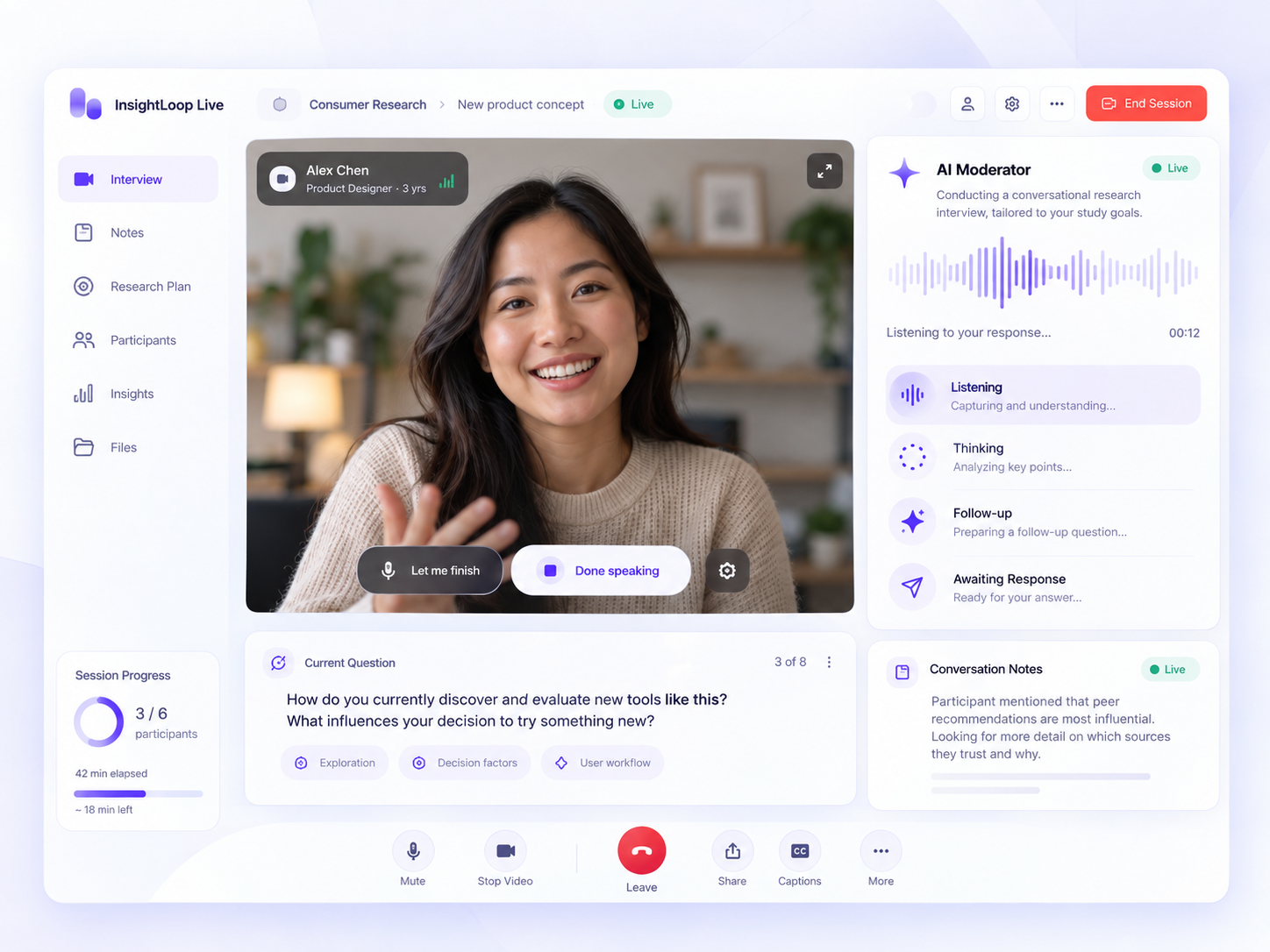
Make AI conversational state visible.
ProblemA pause can mean thinking, finished or wanting to continue.
DecisionExpose Thinking/Listening/Waiting and explicit turn controls.
Trade-offLess ‘invisible magic’; more participant agency.
Preserve the conversation when conditions degrade.
ProblemNetwork failure can damage rapport and lose an answer.
DecisionReduce incoming video intentionally, explain why, recover visibly.
Trade-offTemporary visual fidelity loss protects research continuity.
09 · RESEARCH WORKSPACE
Guide, Notes and Key Moments had to work while the researcher was listening.
Evidence capture and study structure belong beside the conversation—not in a separate tool the moderator has to mentally re-enter.
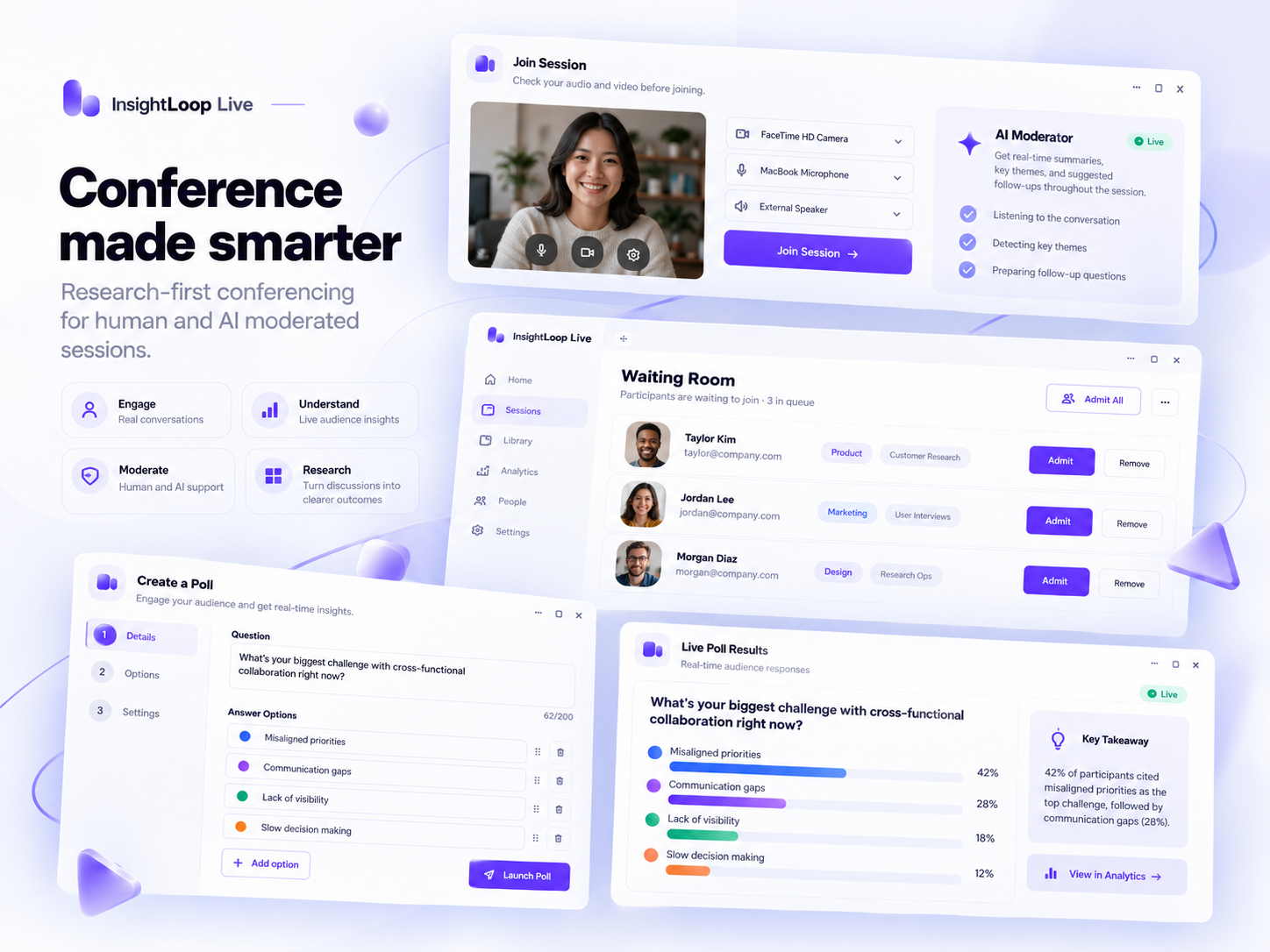
A live moderation instrument—not a document viewer.
Topic/question structures · estimated time · Mark Done · Completed · Discussion Points · compact/expanded widths · empty state.
Capture now. Interpret later.
Timestamped Notes · Bookmark · Key Moment · comments/replies · mentions · edit/delete · linked timecodes.
Chat and Backroom have different consequences.
Participant-facing communication remains distinct from researcher/observer coordination to avoid accidental exposure or research contamination.
Presence is a workflow.
Waiting · Joined · Invited with Admit, Deny, Admit All, Invite and Resend close to the relevant lifecycle state.
10 · RESEARCH ACTIVITIES
Activities stay inside the research conversation.
Polls, Stimuli, Whiteboard and Breakouts are not feature cards. Each is an end-to-end workflow with its own state model.
01Choose
→02Preview
→03Launch
→04Respond
→05Analyse
STIMULI + WHITEBOARD
The study already knows the material.
Screen/window sharing, study stimuli, documents and blank Whiteboards reduce the need to search a desktop mid-session. Whiteboard tools include move, pen, shape and text.
BREAKOUT ROOMS
Complexity stays hidden until the moderator needs it.
Configure → assign → review → start → manage → announce → close/return, including automatic/manual assignment and timing validation.
11 · AI — ASSISTANT VS MODERATOR
AI creates two different interaction contracts.
Treating ‘AI’ as one feature hides the hardest design work. A supportive assistant and an AI controlling the next research turn are fundamentally different relationships.
Assistant inside a human-led session
Human owns the conversation. AI is invoked for summaries, notes or questions and does not control conversational pacing.
AI as interviewer / moderator
AI controls the next research turn, so state, consent and turn completion need to become explicit.
Thinking…→Listening…→Take your time→Let me finish talking→Done Talking
In research, participant agency and response integrity matter more than making AI feel magical.
RESPONSIBLE AI
AI-derived behavioral or emotion-style indicators require validation around accuracy, consent, bias, culture, privacy and interpretation. AI output should support researcher judgment—not silently replace it.
12 · RESPONSIVE + THEMES + ACCESSIBILITY
Responsive did not mean squeezing the desktop interface.
We preserved the same mental model, not the same simultaneous density.
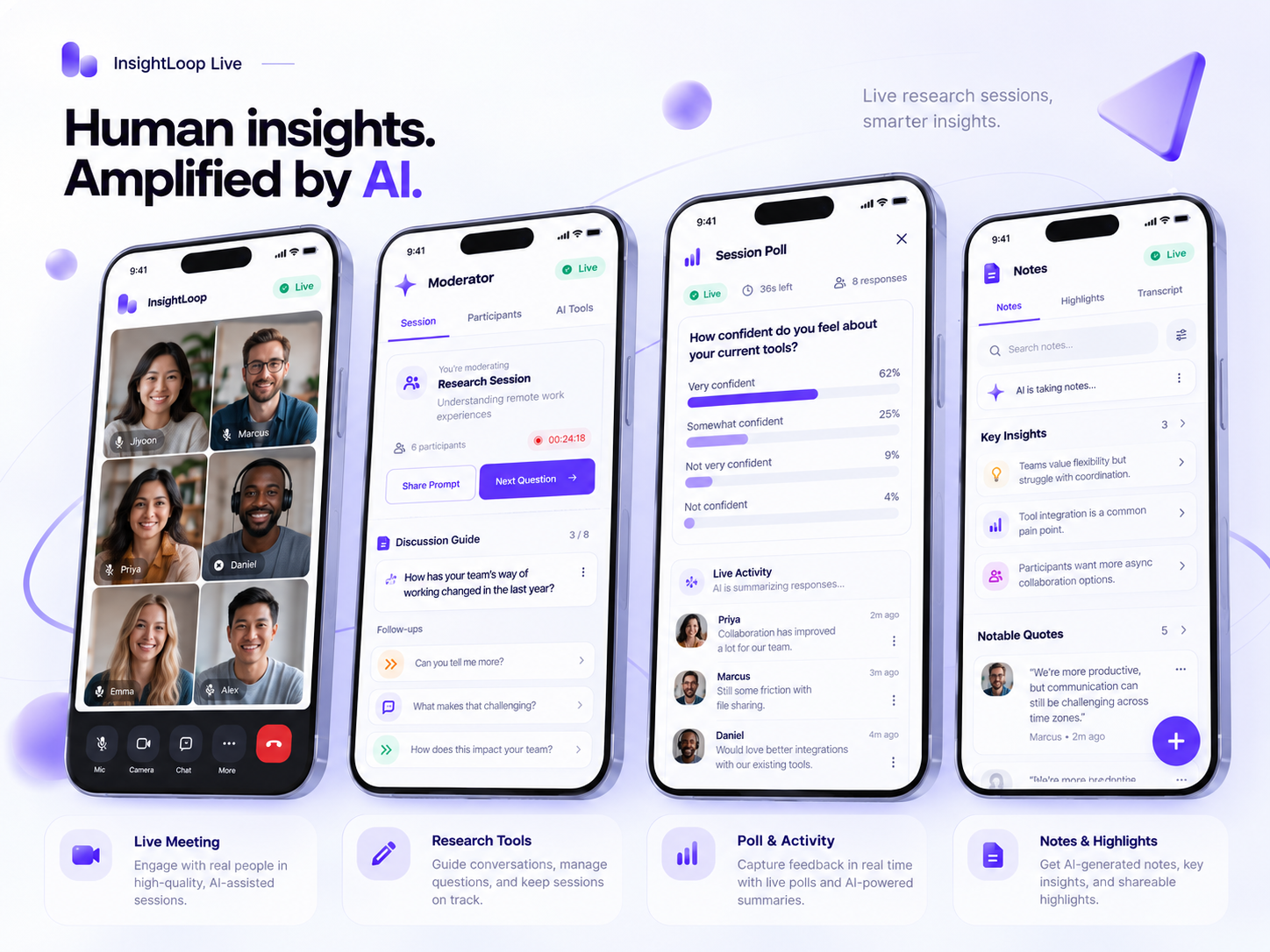
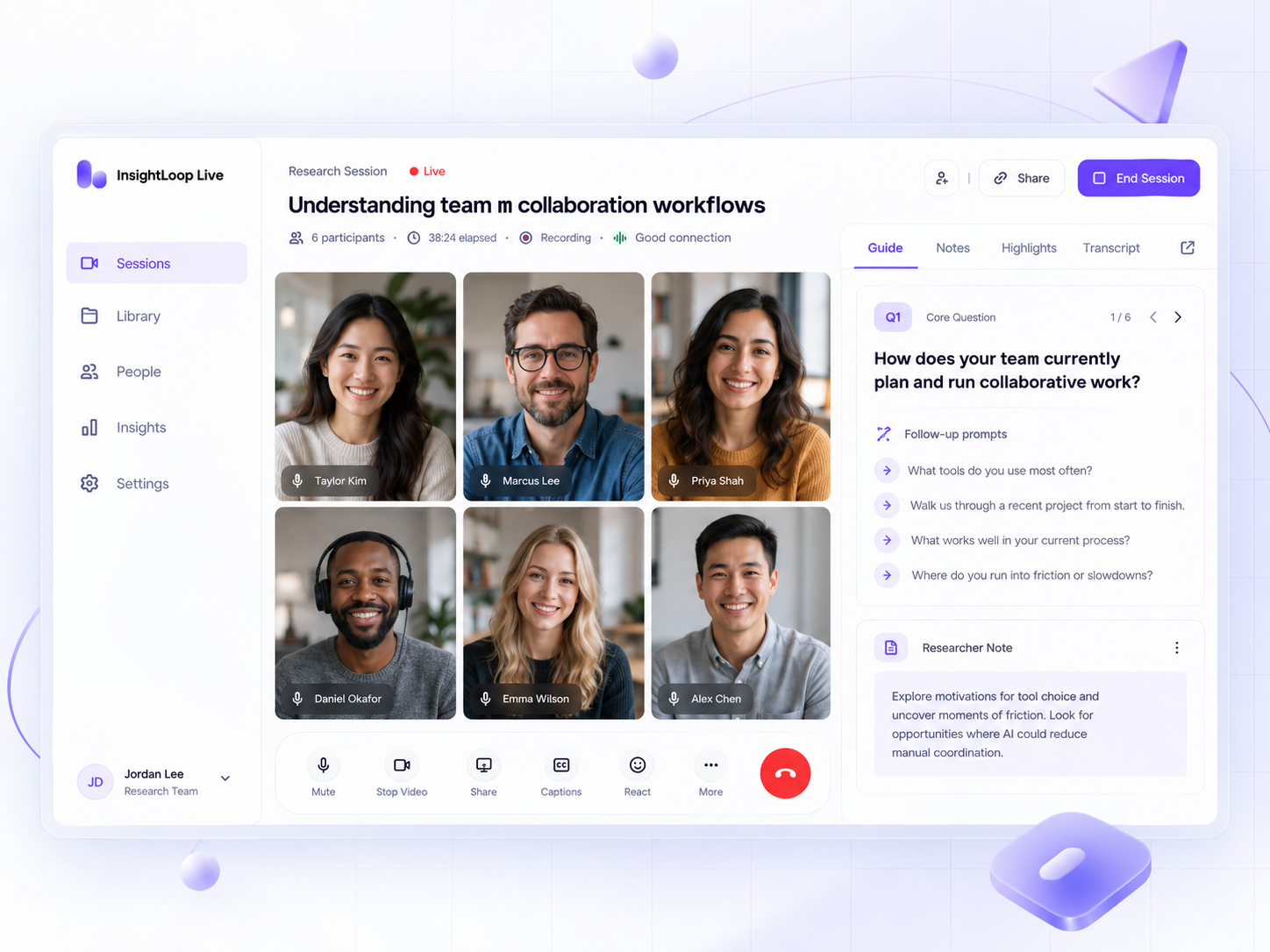
1Active research content
2Participant visibility
3Essential controls
4Role-specific tools
5Secondary actions
Tiled · Spotlight · Sidebar · audio/video settings · captions · language selection · Light / Dark / System theme states.
Reviewed against WCAG-aligned accessibility requirements: captions, labelled controls, status messaging, error feedback and keyboard-relevant interactions. No formal certification is claimed.
13 · RESILIENCE — ERRORS, NETWORK, RECOVERY
A live product is not defined only by its happy path.
The system needed to explain what happened, why it happened and what the user can do next.
PERFORMANCE ISSUE
Protect the conversation before the video.
Detect degradation → recommend turning off incoming video → pause incoming video → explain protection → restore quality → offer video return.
NETWORK LOSS
Recovery should be explicit.
Lost connection → trying to reconnect → maintain meeting identity/context → resume rather than silently reset.
No Discussion GuideExplain absenceReturn to meeting without dead-end
No stimuliExplain study has no materialContinue / choose other share option
Muted micExplain others cannot hearUnmute
Recording stateStarted / stopped feedbackMaintain visible status
Leave / EndExplain consequenceCancel / leave / end for all
Remove participantConfirm destructive actionCancel / confirm
NETWORK QUALITYConnection degraded
Reduce incoming video to protect the conversation.
Reduce videoRECOVERYReconnecting…
Meeting identity and context are preserved.
RESTOREDConnection stabilised
Video can return without resetting the session.
Resume videoDESTRUCTIVE ACTIONEnd session for everyone?
Explain consequence before the irreversible action.
CancelEnd for all
14 · ENGINEERING + UAT + ITERATION
The design was not finished when Figma was finished.
My responsibility extended through component behavior, engineering clarification, implementation review, UAT, fixes and retesting.
01Design intent
→02Component behavior
→03Engineering walkthrough
→04Build
→05Implementation review
→06UAT
→07Fix + retest
→08Release readiness
Guide density
Multiple widths and structures balanced orientation against participant visibility.
AI turn-taking
Explicit turn controls clarified conversational ownership after silence.
Network degradation
Visible quality protection replaced silent failure.
Role density
Participant and Observer capability narrowed relative to Host / Co-host.
BEHAVIORAL DESIGN SYSTEM
Scalability meant reusable behavior, not just reusable visuals.
Participant tiles · meeting controls · notifications · drawers · menus · Guide · Notes · polls · Breakout Rooms · recording · AI state · network state · settings and empty states had to remain coherent across Role × Permission × Session Type × Platform × Theme × Language × Viewport × Network Condition × AI/Human Moderation.
≈100
UAT issues reported as identified / resolved
Visual fidelity · behavior · permissions · controls · research tools · alerts · mobile · network · AI · empty states · recovery.
Approximate delivery metric — not “100 usability problems.”15 · OUTCOMES + CONTRIBUTION
Separate delivery evidence from product-impact evidence.
The project demonstrates breadth, system coherence and implementation maturity. It does not yet prove post-launch behavior or business KPIs.
A 0→1 research-conferencing system.
5 primary platforms · Human + AI moderation · multiple role variants · access/lobby · Guide · Notes · Key Moments · Chat/Backroom · Polls · Stimuli · Whiteboard · Breakouts · transcription · responsive/mobile · theme states · recovery · takeaways · 80+ screens/states (approx.).
Clearer system behavior.
Role separation · workflow integration · explicit AI/meeting feedback · resilient edge states · implementation consistency · responsive behavior.
What requires future evidence.
Task success · participant confidence · moderator cognitive load · research-tool discoverability · AI-state comprehension · mobile performance · representative accessibility testing · post-launch adoption · business KPIs.
I LED
Experience strategy · core architecture · critical flows/UI · interaction direction · role consistency · research integration · team reviews · component behavior · engineering clarification · implementation review · design-led UAT · iteration.
WE DELIVERED WITH
Senior UX Designer · junior designers · Product · stakeholders · UX Research · web/mobile engineers · QA/UAT collaborators.
16 · REFLECTION + NEXT VALIDATION
I started by asking where to place the features. I ended by asking what deserved attention.
A live system is fundamentally an attention-management problem.
The Participant needs simplicity. The Moderator needs research power. The Host needs control. The Observer needs visibility without interference. The AI needs to reveal its state. The network needs to communicate degradation. Mobile needs to hide things without making them undiscoverable.
The strongest interaction model was not the one that exposed the most capability. It exposed the right capability at the right time.
Participant onboardingGuest/login · recording · consent · devices · too-early · waiting · rejoin
Moderator attentionGuide · Notes · Bookmark · Key Moments · Poll · Stimuli without losing focus
Public / privateCan users clearly distinguish Chat from Backroom?
AI turn-takingThinking · Listening · Waiting · Let me speak · finish talking · Done
Network recoveryDo users understand why video was reduced and how it returns?
MobileDoes hierarchy survive small screens, large groups, research tools and sharing?
AccessibilityKeyboard · screen reader · captions · focus · status announcements · non-color meaning
AI InsightsConsent · accuracy · bias · interpretability · appropriate researcher use
AXIOR CONFERENCE TOOL
Protect the conversation. Design everything around it.
I led the design of a zero-to-one research-conferencing system that had to adapt across roles, research activities, human and AI moderation, mobile and desktop contexts, and real-world failure states. Complexity belongs in the system—not in the conversation.
MORE WORK
View all workContinue exploring complex product systems.
More case studies across enterprise workflows, AI-enabled products and multi-persona systems.
%22%2F%3E%0A%3Cellipse%20cx%3D%22640%22%20cy%3D%22360%22%20rx%3D%22380%22%20ry%3D%22240%22%20fill%3D%22url(%23g2)%22%2F%3E%0A%3Cg%20transform%3D%22translate(173%2075)%20scale(0.42)%22%3E%0A%3Ccircle%20cx%3D%22350%22%20cy%3D%22350%22%20r%3D%22310%22%20fill%3D%22url(%23wash)%22%2F%3E%0A%3Cg%20transform%3D%22rotate(-29%20350%20350)%22%3E%0A%3Cellipse%20cx%3D%22350%22%20cy%3D%22350%22%20rx%3D%22298%22%20ry%3D%22194%22%20stroke%3D%22url(%23ring)%22%20stroke-width%3D%2235%22%20fill%3D%22none%22%2F%3E%0A%3Cellipse%20cx%3D%22350%22%20cy%3D%22336%22%20rx%3D%22298%22%20ry%3D%22194%22%20stroke%3D%22%23fff%22%20stroke-opacity%3D%22.8%22%20fill%3D%22none%22%2F%3E%0A%3Cellipse%20class%3D%22t1%22%20cx%3D%22350%22%20cy%3D%22350%22%20rx%3D%22298%22%20ry%3D%22194%22%20pathLength%3D%22200%22%20stroke-dasharray%3D%225%20195%22%20stroke%3D%22%238f80bb%22%20stroke-width%3D%224%22%20stroke-linecap%3D%22round%22%20fill%3D%22none%22%2F%3E%0A%3C%2Fg%3E%0A%3Cg%20transform%3D%22rotate(36%20350%20350)%22%3E%0A%3Cellipse%20cx%3D%22350%22%20cy%3D%22350%22%20rx%3D%22179%22%20ry%3D%22296%22%20stroke%3D%22url(%23band)%22%20stroke-width%3D%2251%22%20fill%3D%22none%22%2F%3E%0A%3Cellipse%20class%3D%22t2%22%20cx%3D%22350%22%20cy%3D%22350%22%20rx%3D%22179%22%20ry%3D%22296%22%20pathLength%3D%22200%22%20stroke-dasharray%3D%225%20195%22%20stroke%3D%22%239cab9f%22%20stroke-width%3D%224%22%20stroke-linecap%3D%22round%22%20fill%3D%22none%22%2F%3E%0A%3C%2Fg%3E%0A%3Ccircle%20cx%3D%22350%22%20cy%3D%22350%22%20r%3D%22277%22%20stroke%3D%22%23b9b4ca%22%20stroke-width%3D%221.2%22%20stroke-dasharray%3D%222%2014%22%20fill%3D%22none%22%2F%3E%0A%3Cg%20stroke%3D%22%23a199b9%22%20stroke-width%3D%222%22%20stroke-opacity%3D%22.6%22%20fill%3D%22none%22%3E%3Cpath%20d%3D%22M211%20151Q300%20159%20350%20350%22%2F%3E%3Cpath%20d%3D%22M587%20270Q490%20284%20350%20350%22%2F%3E%3Cpath%20d%3D%22M264%20541Q312%20477%20350%20350%22%2F%3E%3C%2Fg%3E%0A%3Ccircle%20cx%3D%22357%22%20cy%3D%22364%22%20r%3D%2298%22%20fill%3D%22url(%23hub)%22%20stroke%3D%22%23fff%22%20stroke-width%3D%222%22%20filter%3D%22url(%23shadow)%22%2F%3E%0A%3Ctext%20x%3D%22357%22%20y%3D%22376%22%20text-anchor%3D%22middle%22%20fill%3D%22%23202b40%22%20font-family%3D%22Geist%2C%20system-ui%2C%20-apple-system%2C%20Helvetica%2C%20Arial%2C%20sans-serif%22%20font-weight%3D%22600%22%20font-size%3D%2258%22%20letter-spacing%3D%22-2%22%3EiHRMS%3C%2Ftext%3E%0A%3Ccircle%20cx%3D%22200%22%20cy%3D%22135%22%20r%3D%2265%22%20fill%3D%22url(%23disc)%22%20stroke%3D%22%23fff%22%20stroke-width%3D%222%22%20filter%3D%22url(%23shadow)%22%2F%3E%3Cimage%20href%3D%22data%3Aimage%2Fwebp%3Bbase64%2CUklGRpAIAABXRUJQVlA4WAoAAAAQAAAAXwAAXwAAQUxQSKQCAAABkCRtm%2BI2%2F%2FS0dIUwwx1cXrK9CzMeQOWraG32KkwHcHkVZpR9gjBzd%2F9fDQlmvsAyIhw4kts2d6JJE%2B4tYXmB9EpjjaRcPTgxfbm18gMpf6y0Lk9PDK4uHlaVjOJYRNbsbd54iy749kZz7xoRieOoOktEtjQWPyOleu9V89DcQSDl58XGlswRVWXVxs58AeBd0G4mGpwH8OXMWK0SI7Xqp58AcF7RA9U7AE9O10Xi0r02s0LR05sjZIZNneV6x28BPqAkBg%2FcGk%2BdJXrXzxStMo2Z9WU5TSSHXiLkrFKNgJeHJDKlLFabBBwqoAMmayUsZWXndXhFJVSP6zvF9iz9r4veapyv%2B8X2KLscPCqkh9sltic55DWgUgb1h8T2IAegioqpigNiu5bdzufsik3vdnc5Yunzebt60%2Fd1tVMj219rAAWDvt4upouPkb0NDxJ63LZx1HmhSTjQ0GFSbMeF9mfCNPZ3WMaY1e9CYEII71Yb014vZJpLLUjcVgYyYRsDbUZk6vfh2eBxv26i4hZPZMI3Togt6mUNfAi6XFBWjmeaUR3Pq6jWUk5oqxbltjKMnI%2FQhWGJM1xQxwmnF1IY2fRNlROq3zaJsdJAqkkVGmKNLOWX5lx4SYys%2BgZlheLbKpE9SDWtwh6RJhwvHJoit7gnt2T1OygvFO9WD2XCPIYa2TzzbGOGHTPX2HGtxe5urbBj5QfI%2BQP%2F%2FeRfhH9D%2FO81%2F3eJ%2F7vK%2F7vA%2F7vG%2F7tM%2F7%2BC%2F3%2FRH%2FC%2Fjv9%2FKfv%2F6j8hLuCPa%2BjjMv64kj0u%2FgPiev68BH1ehT8vRJ%2FXos%2FL8ecV6fOi9Hld%2Frw0fV6dvi5AX9egr8vQ15Xo62L0dT36uiR9XZW%2BLkxf12avy9P3FbD3RdD3dbD3pfzJfTX0fUECVlA4IMYFAADwHQCdASpgAGAAPpVCm0qlo6IhqdLrMLASiWMNvNWgH6AfwDQAP4BAgH4AWjaNW7U7%2BfAZt5koEHXY8I5k6ADd%2B0tHzHoftFioPuqv7ANL0fhSYxt%2F%2FtVqQltN9xw9GFjb8rIML2WBaOanvSaDK7o9rSBOCANdmzfNo2fa9N%2Bb%2Fb5fbEmjihOZrtgoJivNCGoJ8teFaC0jNU0H%2Bhlv7QZ1A4Qn0%2FAeFS3MQlQTe6FnL1sVvZZSrGPmFxDx83bsJ%2BdaFEW91sCaAqeepUN6n9Xm3D4H47C%2BjZzvUrhzH7OjEx6kTn1%2FKzSEkoc2T%2BQKPfJwcvHB8drh6AD%2B9iPzfn7mR3FDz%2F9wImAp%2FOUnzMcBLeA04xGZGzvU4cg4X%2Fv1%2BwC%2Fm5rNjcL%2F5AjZ7nOmfx7P51KnwmRUJI4oOR%2Fg3I1RiSPEATXozgfnOXvhLj4cuX7xFD3eLOsWZTn0jTsGd79hvHHCfm9%2FidKjNUaeZq%2FkgzD9zkHiVX78qJhEdCcUQhy%2BLurkfz%2Bl5%2FkvW16hnqKzSXFPJSGVNT2CSFClljaSxV34Uwz2Y1EGfWz5g%2Frjo6XSS1Gx44vBy68Vxcr253UnL9Qot%2BRAoKz2LL8tW%2BlqxckuP49xmiEmClhreYEhWZp8vfeLhWv19l9fpLdbsOXajincl1MWQmx4%2B%2Byyjq0ZFAgz6qL1xMSitolgnuNJNfUWNtoffgy4y6j%2FUlwANBpHBeyX3LevFF7CVyXJB5FP5DP9nvd8cx8Ld7piWUOA3%2BSSU1WB8JtgP5G%2F8aEac0kGHn5HPOJkZs9WaRHr5mLuA7fnUA%2BiKY4YE0ofLYuCaQ2XTstoiWNKAz4UbHRzz69G8%2BUbn8DPxf5ydcTAH0MqL73KmqqG34%2FmNZ5W7U%2BY%2BxenB43OxAkIvNX1iZ59xwEnIsgymBrUIaUBi%2BpBMkZbD0pswOOs3729fyQMNtiLXUOSZqpNTQj1fgSlfkTCxtm1HQeMgtHxob0rqsZ0DCWAQuiMs4Q3DuuD8bEFzMkd1DYtxs9aAvw2%2FT47gVNl5OasD0HVQ%2F2Ati8wAe%2FiSKlvvP%2B5qsbuT%2FDfdWXA%2BGwjpNfsMsH2IZgZWkOdJFBen3DrDi7d5ZE%2FQant8SlCJZvpAUV2GW8kpWUKsF7Ueoixeu6wKsk0xjOqmFYak9sITrP5yUjpyVOrighGP5VGpp5uUAnEtVD610SfLuaIkZLyLqkefQJY%2BCcPzyk0S4NT%2Fpj6Bs6zP%2F%2FnfweXyBIvgaArLyBtgjLmQuFtk%2FQaBQ0wEo1JozSv%2BEFyP%2BrvmrR1SCQl3w2iuU4rpucboI567UxRadFWOjaQLPsLBhEdB%2F7092oXZYIcEx%2BgAm%2FDWI%2FfJH3ppKBjmg%2BL0DCaXJani8LfWYVw0Z5bC7FG%2FJtX93zMN1aUDPQlfVxPGCvWAqsuTBPChhW2X1TCQxVWrq5CJcbgSKPKV5kErpueBGY4mX%2BVSnJdK5KKrnktTSHGkaMXe8iaSbKiI8oQLc9uuQYOWG3mnXPyJQUPKR9Rmn1s09tbL5mcYpZBaCR1w3mEKKcLnS2WM3X9lHbUvVY1BqqzT%2FM6WxAzOWaoBye2l%2Bu%2BbbX%2BQ52y%2F8bP3eya5eRf6NBqUrJcP2oNPiqSEanR%2BHsjUkelkSbRk4T28qh33RCyyqOpoN%2BfhOQ1k8BSpMZpv8znY7dEwBSxk7ay1f3KRUeSVwWle1KEkyrGjz8Y0udYsRIlfPbvi5K8VEjzgPivJur%2B5WpGxLn9740MyoI4sYJA4hZwNDRC43ku%2FR0Qkm0ys41Uz4fS%2B9LOIra9wOMZ%2B61bnhvmMiunc%2Fo%2Bbt17wSvNmjwwxHWZRHWLO9uiHoAgC8n4bIIOfncezGkdPAx4t%2BMM7oyT09%2FGublZOutXyxp8lKPHuy8zpI4yG98pbDS8QOFyDb%2FXfe5sUEgco8ezMneu87d%2B%2F%2FzMoNBc%2F%2B%2FoSBbgAHYn1aUYm4AAAA%3D%3D%22%20x%3D%22140%22%20y%3D%2275%22%20width%3D%22120%22%20height%3D%22120%22%20preserveAspectRatio%3D%22xMidYMid%20slice%22%20clip-path%3D%22url(%23c-manager)%22%2F%3E%3Ccircle%20cx%3D%22200%22%20cy%3D%22135%22%20r%3D%2260%22%20fill%3D%22none%22%20stroke%3D%22%23fff%22%20stroke-opacity%3D%22.85%22%20stroke-width%3D%222%22%2F%3E%3Ccircle%20cx%3D%22605%22%20cy%3D%22282%22%20r%3D%2265%22%20fill%3D%22url(%23disc)%22%20stroke%3D%22%23fff%22%20stroke-width%3D%222%22%20filter%3D%22url(%23shadow)%22%2F%3E%3Cimage%20href%3D%22data%3Aimage%2Fwebp%3Bbase64%2CUklGRlYIAABXRUJQVlA4WAoAAAAQAAAAXwAAXwAAQUxQSKQCAAABkCRtm%2BI2%2F%2FS0dIUwwx1cXrK9CzMeQOWraG32KkwHcHkVZpR9gjBzd%2F9fDQlmvsAyIhw4kts2d6JJE%2B4tYXmB9EpjjaRcPTgxfbm18gMpf6y0Lk9PDK4uHlaVjOJYRNbsbd54iy749kZz7xoRieOoOktEtjQWPyOleu9V89DcQSDl58XGlswRVWXVxs58AeBd0G4mGpwH8OXMWK0SI7Xqp58AcF7RA9U7AE9O10Xi0r02s0LR05sjZIZNneV6x28BPqAkBg%2FcGk%2BdJXrXzxStMo2Z9WU5TSSHXiLkrFKNgJeHJDKlLFabBBwqoAMmayUsZWXndXhFJVSP6zvF9iz9r4veapyv%2B8X2KLscPCqkh9sltic55DWgUgb1h8T2IAegioqpigNiu5bdzufsik3vdnc5Yunzebt60%2Fd1tVMj219rAAWDvt4upouPkb0NDxJ63LZx1HmhSTjQ0GFSbMeF9mfCNPZ3WMaY1e9CYEII71Yb014vZJpLLUjcVgYyYRsDbUZk6vfh2eBxv26i4hZPZMI3Togt6mUNfAi6XFBWjmeaUR3Pq6jWUk5oqxbltjKMnI%2FQhWGJM1xQxwmnF1IY2fRNlROq3zaJsdJAqkkVGmKNLOWX5lx4SYys%2BgZlheLbKpE9SDWtwh6RJhwvHJoit7gnt2T1OygvFO9WD2XCPIYa2TzzbGOGHTPX2HGtxe5urbBj5QfI%2BQP%2F%2FeRfhH9D%2FO81%2F3eJ%2F7vK%2F7vA%2F7vG%2F7tM%2F7%2BC%2F3%2FRH%2FC%2Fjv9%2FKfv%2F6j8hLuCPa%2BjjMv64kj0u%2FgPiev68BH1ehT8vRJ%2FXos%2FL8ecV6fOi9Hld%2Frw0fV6dvi5AX9egr8vQ15Xo62L0dT36uiR9XZW%2BLkxf12avy9P3FbD3RdD3dbD3pfzJfTX0fUECVlA4IIwFAACwGwCdASpgAGAAPpE8lkglo6IhMdgM%2BLASCUAZAw%2BCgSNRIreQLoA4M%2FMGLGPUv7l46choTQgFqv%2FqaOtgjncbdndPh15pfe6qwF0HleZC7mO2Gi9mR3gSqPh4aISNzAbaAdjS8nVVKBirp7T57r%2BYEiJYAAFvDCWU5U%2FrRbkfvldZoZkLjxi9OF1aIA21frXINXgXj4mHcaJaNGOWk7B3wM7rmpV4kfotbgFUj1751fJxrBagcuTtqoQJOPoGqC8IJEQk1tmIY57xNw6Pa%2FUCYL85sld7dSZwFehNTNw%2FD%2B%2BYIzJEAAD%2B9Wr%2F%2F1Nn%2F%2BpZP%2F%2FUGHT%2BkcrLxcvXI%2FWxQchqX5v3i4iFYmMbY0b7E9OfCzoDiqXe4DJsWLXXTuMpBN%2FYNaWLcXoC5zsywsz%2FFTLA6fIv3ymdVl3Vsfv9F6XQ7gh%2BuLL8RGzeoj5lHKJq%2BdNZup8tuJBIpE0528tSSvvkieDj5brkrKntdN624D0FdtH8W2G7o%2BG5HrwRXAGdQL9uLeMnibSOk8ojJBoV8be3Hp6bTqJbEotkSqZyOvYy7vQwy9lIBG2VAQUnEJ3g%2FPC0DwgmEXhtUbfc32Tb4zO%2BoYroZE75gl98rSmeVxTW8M6DQoi1ItdNagVbEA1q38hGlcagCTo96SVyJNoGVff9AXWIT7ymTUaDpTrnbgwJ%2FMu1bI%2FepgyXX3GtNuJ5%2BtxUf7DntTugM9y8g%2F23Kolcdt9zNn1Dyl9B3mnV2Oi6yn%2BCm4Cyf7IqULprrWQET8Pph73%2BiY8NC70CRkEdqDFasRtvDbM3JOh2lIHMHCBOk51%2BM421ykaxIBrvi3ap6KNNyza9bpsHles60KVjwL5dAgMQZG6XV1YlkAAK%2Bq2vjuFudeO%2FI5%2FoSzip%2FaEF3jzy0zWac08X1t4CzVzLGAr%2FHnvoaB%2FR2RivWwC150LcxZtMAEGH7pCaVbtjxPYTo189%2FGBzpTMz7qttY7xdG02uQstqhLCmFXROWK9Tpk98RPUrif7Jn6Y%2FvlkgNTiysznEW%2BJJXLLvgbFXPs4IPrZpZ84JMSa9huXzIRoAOH8L6jtwUMOTTjRzyuFP4xhh33p19mrP91mgSb2eACJZJmg0QZI6PQmhKhBoI564An1E6IenmMTUQcsWhRTcScZVbB3EpUtgx2OEdV5oar1%2BIMKYSLMdvxvu7gZt67kd0HUb6lGjINpDzOqP%2FfW4pcWE7JZXpDBD8px33CEnyaVljQO%2BI0czZp%2Fwp7lPPw5fuUFvDtLu5P9Uv0eTJTGZgEqpREJnekYYeSDrSVwuZHV96LgNvQTxMnzHepacQF26Ac8s909ZczScr7PDstt35Jv%2Bfglyhx1KP7LVd%2BnCAcU7In7uzDn99uyti9%2Fu8A2r4b1TixBjEvaICYLLus%2BOZOk9bvXT3%2B7y2xzAkEk4n467Y9Y6SbVxPTePwjbmMjEG%2BpGOMulzCkPu7Ts%2F7EsUV4CakwBj2sUuKvBrKRkqemVtLl30grahj5uB2O%2B0EBm6gqAvh9bgk25gS1ZuwZnzXtvtxObClwO2QCNulATDt42wAHo%2F3a74tKvu6McnH67Nd2dc6QshfafsFJsMrlR05U9xRC5ixA0ORkI5bxqyNyRcOp8gssQ9JQN6k9nYIGuu1lq0AQtrtwrfixRUPccU29%2BalxKL8%2FYjbdTNRqVZJHGBD6%2FC9e517KWtdqzwy6HQeHqEJckSlf9W2jBo1bb8Pt7%2BuuIsQzVguaBx%2BnabFJ7n80o5qRK4wIFq0t2FaX9t7fu21RClOjIPIZyhO1aaVyW6kzbjjN0%2B6x9xbwae6X%2BbghacAM5M5nLfN9BlhIUgVPHvgK6IMEWpbXtn1%2BC7wJ86HCrUATO1bay0%2F49DKmueYmI%2F1vazmdjboAAA%22%20x%3D%22545%22%20y%3D%22222%22%20width%3D%22120%22%20height%3D%22120%22%20preserveAspectRatio%3D%22xMidYMid%20slice%22%20clip-path%3D%22url(%23c-recruiter)%22%2F%3E%3Ccircle%20cx%3D%22605%22%20cy%3D%22282%22%20r%3D%2260%22%20fill%3D%22none%22%20stroke%3D%22%23fff%22%20stroke-opacity%3D%22.85%22%20stroke-width%3D%222%22%2F%3E%3Ccircle%20cx%3D%22262%22%20cy%3D%22555%22%20r%3D%2265%22%20fill%3D%22url(%23disc)%22%20stroke%3D%22%23fff%22%20stroke-width%3D%222%22%20filter%3D%22url(%23shadow)%22%2F%3E%3Cimage%20href%3D%22data%3Aimage%2Fwebp%3Bbase64%2CUklGRlYKAABXRUJQVlA4WAoAAAAQAAAAXwAAXwAAQUxQSKQCAAABkCRtm%2BI2%2F%2FS0dIUwwx1cXrK9CzMeQOWraG32KkwHcHkVZpR9gjBzd%2F9fDQlmvsAyIhw4kts2d6JJE%2B4tYXmB9EpjjaRcPTgxfbm18gMpf6y0Lk9PDK4uHlaVjOJYRNbsbd54iy749kZz7xoRieOoOktEtjQWPyOleu9V89DcQSDl58XGlswRVWXVxs58AeBd0G4mGpwH8OXMWK0SI7Xqp58AcF7RA9U7AE9O10Xi0r02s0LR05sjZIZNneV6x28BPqAkBg%2FcGk%2BdJXrXzxStMo2Z9WU5TSSHXiLkrFKNgJeHJDKlLFabBBwqoAMmayUsZWXndXhFJVSP6zvF9iz9r4veapyv%2B8X2KLscPCqkh9sltic55DWgUgb1h8T2IAegioqpigNiu5bdzufsik3vdnc5Yunzebt60%2Fd1tVMj219rAAWDvt4upouPkb0NDxJ63LZx1HmhSTjQ0GFSbMeF9mfCNPZ3WMaY1e9CYEII71Yb014vZJpLLUjcVgYyYRsDbUZk6vfh2eBxv26i4hZPZMI3Togt6mUNfAi6XFBWjmeaUR3Pq6jWUk5oqxbltjKMnI%2FQhWGJM1xQxwmnF1IY2fRNlROq3zaJsdJAqkkVGmKNLOWX5lx4SYys%2BgZlheLbKpE9SDWtwh6RJhwvHJoit7gnt2T1OygvFO9WD2XCPIYa2TzzbGOGHTPX2HGtxe5urbBj5QfI%2BQP%2F%2FeRfhH9D%2FO81%2F3eJ%2F7vK%2F7vA%2F7vG%2F7tM%2F7%2BC%2F3%2FRH%2FC%2Fjv9%2FKfv%2F6j8hLuCPa%2BjjMv64kj0u%2FgPiev68BH1ehT8vRJ%2FXos%2FL8ecV6fOi9Hld%2Frw0fV6dvi5AX9egr8vQ15Xo62L0dT36uiR9XZW%2BLkxf12avy9P3FbD3RdD3dbD3pfzJfTX0fUECVlA4IIwHAAAQIgCdASpgAGAAPpVAmkklo6IhLHScWLASiUAWWHX6gjjZeoY9v3zy2nEbzj%2Fo8A7%2BgDgr8jXyeWz0AZhrXnAOw50%2BvzDzzekVoieuPYJ%2FW9bVrlybMPyancGFoZ5oWR23Jz%2F4j4fIPAchIEB0X68odjiBFfE3d4VdBNUESTrWhWECCbkWkGVNxvC%2FNKGl7SqW5Yp1PkvNk7zuPKWy8i165cV7pRaun%2BY5Z9twLXol7spLqSBQVj0E6u4BBje9sLgljXKy9SxCer8XaTCeDSfOihIum3Blbzm27xMTj6ioLECUJ4Ql8ArVmu8zcMNxnYq5ZQaMZXofctxPWPeg1Rk489qJZTJdUCIRiKWKFMBQYarHU5hPXjWYAAD%2Bknef%2BWm3QVj08bGbV%2F1GxH3VuIZ4wNr55OIZW9GaIL23%2F5%2FOrJHHg%2FJ17zFQcV8Dk3MlhRswSp1v%2Bvw8ox%2FL9Gs%2B6XbTD6I3rkzCkvNIL%2B%2Fr7TmcbHJzkXqFMK%2FCl7fEO97MH5%2FvlowHdCrCMgUtAWP6xVGDDLNFDtp1i5e84CC1kR%2FFAl4mYAs401iWcHW6cpk1X6m2EPY2fB7lFEoszpsQ4YfxTItz%2BrvwYYHyXgnPb%2BcAfRvibVKybexm76FT9T4KaQ08WF%2F1%2F3U2lPAYg0GJsPvLd%2FY4iJMev%2FMWQBSQklwzaXHYkULXXUL4nRLVrfyAKDbHEN%2BAo0z6E%2BRK1sFSq6dJLEr9oZZ4HQRixXn8M%2FTGr1tzxhu%2BV1VPzyAqIIZ7DyCtq25RU9pvhNxuxE4ItX9t8nEr5tiGG4ecRSdImxQRiaXctxz%2B%2BVl%2B32OzzDnIzzOpTYc2jIrKqSKXPnuq8phDQjWxQgWUMfAIZGDsXiJBVSX%2FUQ75Ez2hrXTWNu0Uc7lNwjdFC7LTcuYtTIoEv60cINqrd4q%2Fse%2Bm75eMXJpErh073b%2FxVETwzSvkLNvnE5q7ZG1H3YhrnEqikfCoSoq%2Bq91zD1GmrXP%2FyG9mVGt1QRlWlCFno%2B0hIgdORZQCssqaBekNkhC3G5nbvcDrlJxWRl3Bz62y2dD6NSY%2FHEpFMQOPMm8pkS9bCTnTGcZ9iBkMey3OphrE2PpQRIZoInWLsUWmzpNgnTar8i4Z67Axqfojqnn7qET4hsRTtig19Hur%2B%2FNOjPS6WfPQbn1u54w3dB4BbJtgW8fmzZccWED6o%2FrefXHNk0pMwl3Xi2EYDR87N3VcM69PGTkQBysP8ylO3owSc9567x%2B7C8L05wLtOAJNkdi%2BwvEfIYwdro1123oU9h568bWMxVR52%2BAzo9KeTzwR8afkmy2DByzc%2F7tqPeakhpNX1ZwDGVk%2BZ%2Bhz3Z75IIJ9hm4I26Vs1mOH5AbrDCUMZgEt8RqvkwPPPD8%2FS3WBqcgswqt2c0oKW0ofoww%2FILDlpeSFf%2BczVB%2BZMecHyPgHUBKiM631B2%2F5vcH6mGfUrmdIsSGb4RDppY8M6kL1BM3pHgZaBSeDYpLE%2BkRbPwBL8n0%2BxB2NR2WZO5u2CoyBZXWcY5IVIIZv8m8Ivh7ifklDPWh8XzzI6%2FpVjw0OoBhONbs4GSAGP95BnxBk49LZNIw%2FTLxi%2BDhlIO81V3D1lj0KUzi1p9BG0uufBHM8rckxljLKfuX%2FcgJhOp6J5MOixb%2B581Q8ASl9W%2FBxvm6B3McsCfTeO%2F8Q%2FPG8Gv4LnY25hFw54iDsK7uA6ob9ziX7Z6dZfAPtuDgoUwXWKQJ9kXJq3%2BtesjKQHHbcKFt3LicNy8z7I6ua8nOXoLCJfXWGvsc5RraguN1uKMX3m794bcTXxQajnlNZG209caNPiY90l49oV6HzaPhAIQyvwm54%2F0Z4H0sYtNrvaAh7LXK0kHbUnVMtpEQU1Xty7kjbBLVQWZgynQARsAz504mt0MLYG6D6x43zMww3fLdrbGggZlb71IK2THsWlgsvi%2FfA4P%2FeQK94vVy9JFoMHhwtnCfq%2Fup7vKFaQNhzjuQRDhQvzllyqxvolnQNMLoFNHs2MpeybPJK7KzEXJ0KhMYlfsuUwGN6vRvJ84mYNksqN8ErXvCxa6LuwPamt%2BDsYqZeLOuy1d9r5o7v%2BYhbTppUN2IKHR4%2FcUh5%2BHQKGEHSAC1fnqHs9NkDfI4CJd4y424D57GAOQ6JuxsUPeIuWskknZgBx5V3cOcwa2qDUJfSniVlpYUGwf%2BI8Cz0F8U2Kze0p6wJrRgJ9PuwJ1ovZuzwohIt09TBvrSpd%2B5mzaYThLsboOa5Y0q08NqcIHaWQStFLvZwwweHV9JFq6mwaTZ%2F1JMOOMvt1CQBDj8rhPKCFdqZ7Q1kn9qoKpCX3EhbxbEt5sm3Cyc4tUiYpaIF3zwY3u4d1m9fmt%2F2NUHEqwRRfVCXIloYTC8CbPdeHbE551bV2n4c9%2Fdfnnur53vnOVaeRMUJ7pnTt73mJm%2FHSQ3YxNmTS8zsJ9f8eOjXfo0zGfA4uG6kjlVi60ChnwnXCuluscdpx4IBCZY8AHT8hAdIKq7ZjISlARMGOznoZ2mm%2FKXMAPFcuR4H8EoAntbqXW9CXMgsE%2F7Nv%2F%2F3RL%2F%2B57f%2F%2FuaeQ5M3DuBeu2mdAAA%3D%22%20x%3D%22202%22%20y%3D%22495%22%20width%3D%22120%22%20height%3D%22120%22%20preserveAspectRatio%3D%22xMidYMid%20slice%22%20clip-path%3D%22url(%23c-candidate)%22%2F%3E%3Ccircle%20cx%3D%22262%22%20cy%3D%22555%22%20r%3D%2260%22%20fill%3D%22none%22%20stroke%3D%22%23fff%22%20stroke-opacity%3D%22.85%22%20stroke-width%3D%222%22%2F%3E%0A%3C%2Fg%3E%0A%3C%2Fsvg%3E)